4.7. Input/Output
In this section, we will describe the various operators used for analysis and I/O in DEM simulations.
4.7.1. Configuration
4.7.1.1. IO Configuration
This operator is used to define the tree structure of output files. By default, exaDEM proposes a tree structure with names defined in the config_exaDEM file. You can override this operator yourself by redefining it in the io_tree operator.
Name: io_config
Description: This operator defines the tree structure of output files.
- Parameters:
avg_stress_tensor_name : Write an output file containing stress tensors.
dir_name : Main output directory.
interaction_basename : Write an output file containing interactions.
log_name : Write an Output file containing log lines.
YAML example:
- io_config:
   dir_name: "ExaDEMOutputDir"
   log_name: "log.txt"
   avg_stress_tensor_name: "AvgStressTensor.txt"
   interaction_basename: "InteractionOutputDir-"
4.7.2. MPIIO / .dump Format
4.7.2.1. Reader Of MPIIO File
Name: read_dump_particle_interaction
Description: This operator reads a dump file with all particle information required to restart the simulation. See operator: @write_dump_particles
- Parameters:
filename : Dump file name to read.
bounds : If set, override the domain’s bounds, filtering out particles outside of overriden bounds (AABB = [[infx, infy, infz],[supx, supy, supz]]). If set to true and shrink_to_fit is true, try to reduce the domain’s grid size to the minimum size enclosing fixed bounds.
expandable : If set, override domain expandability stored in file
periodicity : If set, overrides the domain’s periodicity stored in a file with this value (ex: [false,true,false]).
timestep : If set, overrides the time iteration number.
scale_cell_size : If set, this option rescales cell size. Due to friction storage per cell, you can only multiply this size by an integer (1,2,4, 8, …) or divide it by a power of 1/(2^n) (0.5,0.25 …).
shrink_to_fit : If set to true and bounds were specified, try to reduce the domain’s grid size to the minimum size enclosing fixed bounds.
enable_extra_data : Read Interactions.
YAML example:
- read_dump_particle_interaction:
    filename: last.dump
Note
This operator is used for spheres and not polyhedra because we need a special reader to read current interaction values containing the friction and moment. Show read_dump_particle_interaction.
4.7.2.2. Writer Of MPIIO Files
Name: write_dump_particle_interaction
Description: This operator writes a dump file with all particle information required to restart the simulation. See operator: @read_dump_particles.
- Parameters:
compression_level Zlib compression level.
filename Dump output file name.
Default behaviour: the default name is defined by : - timestep_file: “exaDEM_%09d.dump and piloted by simulation_dump_frequency: 1 in the operator global.
Note
This operator is defined in the default ExaDEM operator named dump_data_particles.
4.7.2.3. Restart Operator
Name: restart
Description: Finds and reads everything needed to restart a simulation, in one operator: the latest (or a given)
exadem_*.dumpcheckpoint under<dir_name>/CheckpointFiles/, the matching shape file (RestartShapeFile.shpby default) if the simulation uses polyhedra, and the matching drivers storage file (drivers_<iteration>.msp, written by dump_drivers, see the Drivers Format section below) if there are any drivers. This replaces manually chaining read_dump_particle_interaction, a shape reader, and a driver restore.- Parameters:
dir_name (optional): Main output directory, usually already set by io_config. Checkpoints are looked up under
<dir_name>/CheckpointFiles/.restart_iteration (optional): Checkpoint iteration to restart from. Defaults to the latest
exadem_*.dumpfound under<dir_name>/CheckpointFiles/.shape_filename (optional): Overrides the default
<dir_name>/CheckpointFiles/RestartShapeFile.shpshape file.drivers_filename (optional): Overrides the default
<dir_name>/CheckpointFiles/drivers_<iteration>.mspdrivers storage file. If neither is given nor found, drivers are simply left empty – not every simulation has any.
For spheres there is no shape file at all, and not every simulation has drivers: if either is missing (not given and not found at its default path), it is simply skipped – no error.
YAML example:
input_data:
  - restart

input_data:
  - restart:
     restart_iteration: 12345
     shape_filename: OtherCheckpointDir/shapes.shp
Note
domain: must still be defined in the .msp file as usual (grid size, periodicity,
…); only the particle/shape/driver state comes from the checkpoint.
4.7.2.4. Restart file script
The scripts/tools/restart_template.py script adapts an existing, real launch .msp file
for restart, so you don’t have to hand-edit input_data:/setup_drivers: yourself. Given a
launch file, it writes a new <name>_restart.msp next to it, ready to run.
Usage:
python3 scripts/tools/restart_template.py path/to/my_simulation.msp
# -> writes path/to/my_simulation_restart.msp
Warning
How it rewrites input_data:
The generated file’s input_data: is not a copy of the original one. Every entry is
dropped and replaced with a single - restart (the Restart Operator above), except
entries whose name ends in _params (multimat_contact_params:,
drivers_contact_params:, inner_bond_params:, …), which are kept, in their original
order, right after - restart. Concretely:
# before, input_data: in my_simulation.msp
input_data:
  - init_rcb_grid
  - particle_type: { type: [ Sphere1, Sphere2 ] }
  - lattice: { structure: BCC, types: [ Sphere1, Sphere2 ], size: [ 1.0, 1.0, 1.0 ] }
  - set_fields: { polyhedra: false, type: [ Sphere1, Sphere2 ], radius: [ 0.5, 0.25 ] }
  - multimat_contact_params: { group1: [0], group2: [0], kn: [5000], kt: [4000], kr: [0.0], mu: [0.1], damprate: [0.999] }

# after, input_data: in my_simulation_restart.msp
input_data:
  - restart
  - multimat_contact_params: { group1: [0], group2: [0], kn: [5000], kt: [4000], kr: [0.0], mu: [0.1], damprate: [0.999] }
If your original input_data: relies on any other operator to (re)build simulation state
– a custom field-setup operator that isn’t a *_params entry, for instance – it is
silently dropped and must be re-added to the generated file by hand.
setup_drivers: is dropped entirely (drivers are restored by restart itself from
dump_drivers’s file, not by re-running register_*: operators), and global: has
apply_particle_sticking forced to false (restored bonds already encode which particles
are stuck; recomputing it against already-evolved positions would be wrong). Every other
block (domain:, compute_force:, includes:, …) is kept byte-for-byte, and comment
lines are stripped throughout.
4.7.2.5. Dump Inspection & Export Tools
A few small operators, each with a command-line wrapper script in scripts/tools, let you look
at or convert a .dump checkpoint file (written by write_dump_particle_interaction above)
without writing a full simulation input file by hand.
4.7.2.5.1. dump_inspector
Name: dump_inspector
Description: Reads a .dump checkpoint file’s header and prints its content (format version, particle count, timestep, physical time, field list, domain). No particle data is read.
- Parameters:
filename: Path to the .dump checkpoint file to inspect.
YAML example:
- dump_inspector:
   filename: CheckpointFiles/exadem_0000012345.dump
From the command line, the dump_inspector.sh wrapper builds this YAML input for you and
takes the .dump path as a plain argument. CMake also drops a dump_inspector launcher next
to the exaDEM binary in the build directory, so it works the same way:
./scripts/tools/dump_inspector.sh CheckpointFiles/exadem_0000012345.dump   # from the source tree
# or, from the build directory:
./dump_inspector CheckpointFiles/exadem_0000012345.dump
4.7.2.5.2. dump_to_txt / ConvExaDEMToTxt
Name: dump_to_txt
Description: Reads a .dump checkpoint file and exports it to plain-text column files: <pattern_name>_particles.txt (one row per particle, columns taken from the dump’s own header), <pattern_name>_interactions.txt (one row per interaction, only written if the dump has any), and <pattern_name>_summary.txt. Whether the dump was written with read_dump_particle_interaction or read_dump_particle_fragmentation (which adds a cluster field) is detected automatically from the dump’s own header, nothing to choose.
- Parameters:
filename: The .dump file to export.
pattern_name: Output prefix for the generated .txt files.
Note
This operator only writes files from MPI rank 0; run it with a single rank (mpirun -n 1)
for a complete export.
YAML example:
- dump_to_txt:
   filename: exadem_0000012345.dump
   pattern_name: exadem_0000012345
From the command line, the ConvExaDEMToTxt wrapper builds this YAML input for you:
./scripts/tools/ConvExaDEMToTxt CheckpointFiles/exadem_0000012345.dump my_export   # from the source tree
# or, from the build directory:
./ConvExaDEMToTxt CheckpointFiles/exadem_0000012345.dump my_export
4.7.2.5.3. dump_to_rockable / ConvExaDEMToRockable
Name: dump_to_rockable
Description: Reads a .dump checkpoint file and exports its particles to a Rockable .conf file.
- Parameters:
filename: The .dump file to convert.
conf_filename: Output Rockable .conf file path.
shape_filename (optional): A .shp file mapping each particle type index to its shape name; copied next to conf_filename as shape.shp, and used to write one
density <group> <value>header line per group actually present. Without it, the particle name column in the .conf is just the numeric type index, no density lines are written, and no shape.shp is copied.dt (optional, default
0): Timestep size written to the .conf’s dt line, not stored in a .dump, so it must be given explicitly if needed.
Note
Only particles are exported for now, interactions and drivers are not written to the .conf file (nDriven is always 0).
Note
This operator only writes files from MPI rank 0; run it with a single rank (mpirun -n 1)
for a complete export.
YAML example:
- dump_to_rockable:
   filename: ExaDEMOutputDir/CheckpointFiles/exadem_0000012345.dump
   conf_filename: conf0.conf
   shape_filename: ExaDEMOutputDir/CheckpointFiles/RestartShapeFile.shp
   dt: 0.0001
From the command line, the ConvExaDEMToRockable wrapper builds this YAML input for you:
./scripts/tools/ConvExaDEMToRockable ExaDEMOutputDir/CheckpointFiles/exadem_0000012345.dump conf0.conf   # from the source tree
./scripts/tools/ConvExaDEMToRockable ExaDEMOutputDir/CheckpointFiles/exadem_0000012345.dump conf0.conf ExaDEMOutputDir/CheckpointFiles/RestartShapeFile.shp
# or, from the build directory:
./ConvExaDEMToRockable ExaDEMOutputDir/CheckpointFiles/exadem_0000012345.dump conf0.conf
--last picks the highest-iteration exadem_*.dump (and RestartShapeFile.shp, if
present) under <input-dir>/CheckpointFiles/ for you, <input-dir> defaults to
ExaDEMOutputDir (the usual dir_name/io_config default), override with
--input-dir=DIR; --dt=VALUE sets the timestep:
./scripts/tools/ConvExaDEMToRockable --last conf0.conf
./scripts/tools/ConvExaDEMToRockable --last conf0.conf --input-dir=OtherOutputDir --dt=0.0001
4.7.2.5.4. dump_to_xyz / ConvExaDEMToXYZ
Name: dump_to_xyz
Description: Reads a .dump checkpoint file and exports its particles to a plain .xyz file: particle count, then the domain bounds’ upper corner, then one
type x y zrow per particle. Which of the known .dump field-set combinations (interaction/fragmentation, with/without a group field) matches the dump is auto-detected from its header.- Parameters:
filename: The .dump file to convert.
xyz_filename: Output .xyz file path.
shape_filename (optional): A .shp file mapping each particle type index to its shape name, used as the
typecolumn. Without it (and without type_map), the numeric type index is used.type_map (optional): List of names indexed by particle type, e.g.
[S1, S2, S3], used as thetypecolumn instead of the numeric index. Takes priority over shape_filename’s names if both are given.
Note
This operator only writes files from MPI rank 0; run it with a single rank (mpirun -n 1)
for a complete export.
YAML example:
- dump_to_xyz:
   filename: ExaDEMOutputDir/CheckpointFiles/exadem_0000012345.dump
   xyz_filename: out.xyz
   shape_filename: ExaDEMOutputDir/CheckpointFiles/RestartShapeFile.shp
   type_map: [S1, S2, S3]
From the command line, the ConvExaDEMToXYZ wrapper builds this YAML input for you:
./scripts/tools/ConvExaDEMToXYZ ExaDEMOutputDir/CheckpointFiles/exadem_0000012345.dump out.xyz   # from the source tree
./scripts/tools/ConvExaDEMToXYZ ExaDEMOutputDir/CheckpointFiles/exadem_0000012345.dump out.xyz ExaDEMOutputDir/CheckpointFiles/RestartShapeFile.shp
# or, from the build directory:
./ConvExaDEMToXYZ ExaDEMOutputDir/CheckpointFiles/exadem_0000012345.dump out.xyz
--last picks the highest-iteration exadem_*.dump (and RestartShapeFile.shp, if
present) under <input-dir>/CheckpointFiles/ for you, <input-dir> defaults to
ExaDEMOutputDir (the usual dir_name/io_config default), override with
--input-dir=DIR; --type-map=[S1,S2,S3] maps type indices to names directly, without a
.shp file (and takes priority over one if both are given):
./scripts/tools/ConvExaDEMToXYZ --last out.xyz
./scripts/tools/ConvExaDEMToXYZ --last out.xyz --input-dir=OtherOutputDir --type-map=[S1,S2,S3]
4.7.3. Drivers Format
Driver state (position, velocity, motion parameters, …) is checkpointed separately from
particles, in its own .msp file. It is written and read back automatically: the same
simulation_dump_frequency setting that checkpoints particles and interactions (see
io_config / Writer Of MPIIO Files above) triggers dump_drivers (below), and the Restart
Operator above reads its file back via read_drivers (below) – normally you won’t call
either operator directly.
Note
The default pipeline also writes a second, legacy file, driver_%010d.msp
(operator write_op_drivers): a setup_drivers:/register_*: snippet meant to be
pasted into a top-level includes: list for a manual restart that doesn’t use the
Restart Operator. Normally you shouldn’t need it – see the I/O Drivers section of the
Drivers page if you do.
4.7.3.1. dump_drivers
Name: dump_drivers
Description: Writes driver information to
<dir_name>/CheckpointFiles/drivers_%010d.msp, in a plaindrivers:storage format (one entry per driver: type, id, state, params, and for RSHAPE drivers a filename/minkowski) meant to be read back directly by read_drivers.- Parameters:
dir_name: Main output directory.
timestep: Iteration number (used to build the output filename).
YAML example:
- dump_drivers
Note
This is part of the default dump_data_particles pipeline, alongside
write_dump_particle_interaction and write_op_drivers – it normally doesn’t need to be
called explicitly.
Output format (one entry per driver, e.g. a stationary surface driver):
drivers:
  - type: SURFACE
    id: 2
    state: {offset: -10, center: [0, 0, -10], normal: [0, 0, 1], vel: [0, 0, 0], vrot: [0, 0, 0], surface: 0}
    params: {motion_type: STATIONARY, motion_vector: [0, 0, 0], motion_start_threshold: 0, motion_end_threshold: 1e+300}
4.7.3.2. read_drivers
Name: read_drivers
Description: Reads a drivers storage file (written by dump_drivers) and registers each driver it contains – restoring drivers at restart time without going through
setup_drivers:/register_*:operators or a top-levelincludes:.- Parameters:
filename: Path to a drivers storage file, as written by dump_drivers.
YAML example:
- read_drivers:
   filename: ExaDEMOutputDir/CheckpointFiles/drivers_0001400000.msp
Note
The Restart Operator above calls this automatically; you only need it directly if you’re
restoring drivers outside of restart (e.g. a manual, chained restart).
4.7.4. Rockable Format
4.7.4.1. Reader Of Rockable Files
Name: read_conf_rockable
Description: This operator reads a rockable output file. However, some lines are not processed by the reader, such as the contact law type or its parameters.
- Parameters:
bounds This option defines the simulation domain. If not specified, the domain size is determined by the particle positions. Ex: [[0,0,0],[1,1,1]].
filename Dump file name to read.
enlarge_bounds Define a layer around the volume size. Default size is 0.
- bounds_mode (str) Defines the bounding box calculation mode.
Default is
COMPUTED_BOUNDS(bounds are dynamically calculated from particles and shapes). An alternative isDOMAIN(uses predefined global domain limits).
region (Region object) Filters particles or IDs based on a specified geometric region.
Yaml Example:
input_data:
  - read_conf_rockable:
     filename: input_file/518_poly.conf

input_data:
  - read_conf_rockable:
     filename: input_a10.txt
     bounds_mode: DOMAIN
     region: AREA
What is read:
t
dt
density
periodicity
nDriven
shapeFile
precision
Particles
Interactions (read but NOT used)
What is not read:
Interfaces
gravity
AddOrRemoveInteractions
UpdateNL
forceLaw
Contact law parameters
interVerlet
interConf
tmax
DVerlet
dVerlet
ParamsInInterfaces
dynamicUpdateNL
ContactPartnership
cellMinSizes
iconf
boxForLinkCellsOpt
4.7.4.2. Writer Of Rockable Files
Name: write_conf_rockable
Description: This operator writes a minimal rockable output file to use the rockable tool see.
No parameter
YAML example:
iteration_dump_writer:
  - write_conf_rockable
Note
Only particles data are written to use the rockable tool see.
Note
To convert an existing .dump checkpoint file to a Rockable .conf file instead of
writing one during a live simulation, see dump_to_rockable / ConvExaDEMToRockable in
the MPIIO / .dump Format section above.
4.7.5. XYZ Format
4.7.5.1. Reader Of xyz File
Name: read_xyz
Description: This operator reads a file written according to the xyz format.
- Parameters:
bounds_mode : Bounding-box calculation mode. Default is
FILE_BOUNDS(bounds taken from the xyz file itself).enlarge_bounds : Define a layer around the volume size in the xyz file. Default size is 0.
file : File name, this parameter is required.
pbc_adjust_xform : Adjust the form.
YAML example:
- read_xyz:
  file: input_file_rigid_surface.xyz
  bounds_mode: FILE
  enlarge_bounds: 1.0 m
How to build your xyz input file of nb particles.
nb
box_size_x box_size_y box_size_z
type_0 pos_x_0 pos_y_0 pos_z_0
type_1 pos_x_1 pos_y_1 pos_z_1
type_2 pos_x_2 pos_y_2 pos_z_2
...
type_nb-1 pos_x_nb-1 pos_y_nb-1 pos_z_nb-1
This is an example of two particles the same type in a domain [[0,0,0],[10,10,10]].
2
10 10 10
0 2.5 5.0 5.0
0 7.5 5.0 5.0
4.7.5.2. Writer Of XYZ Files
Name: write_xyz
Description: This operator writes a txt file (.xyz) with all specified fields.
Parameters: * fields: array of fieldsets. Example:
[ id, velocity, radius ]* filename: name of the output file. * units: array of units. Example:{ velocity: "m/s", radius: "m" }
Note
The first line of the output file contains the number of particles. The second line contains the “lattice” description, useful when using ovito.
YAML example: Replaces MPIIO output files with xyz files.
dump_data_xyz:
  - timestep_file: "dem_pos_vel_%09d.xyz"
  - write_xyz:
     fields: [ id, velocity, radius ]
     units: { velocity: "m/s", radius: "m" }

iteration_dump_writer:
  - dump_data_xyz

global:
  simulation_dump_frequency: 500
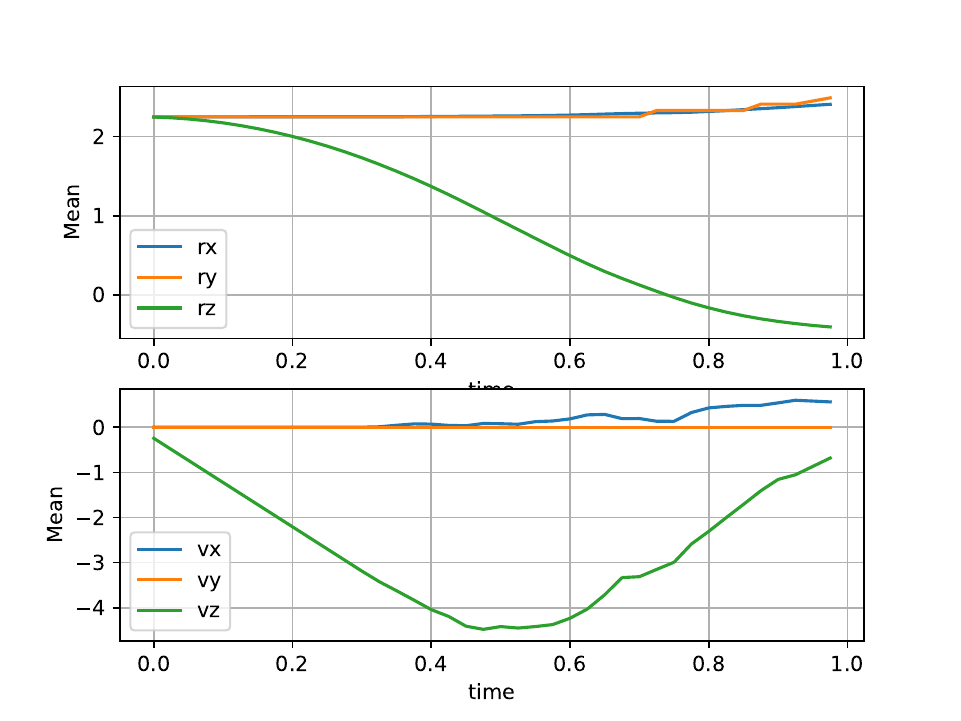
To process these files, a sample script is provided in scripts/post_processing/profile_pos_vel.py. This is a minimal, easily modifiable post-processing file that calculates the averages of all position and velocity components.
Output file: [mean_r_v.pdf]
4.7.6. Shapes
4.7.6.1. Read Shape File
The purpose of this operator is to add shapes to a collection of shapes. This operator can be called as many times as desired. However, if you add the same shape multiple times, it will create duplicates. Additionally, the shapes will be ordered according to the order of reading, meaning that type 0 will be associated with the first shape from the first input file. Furthermore, this operator will automatically create a polydata for each shape, which will be used for displaying the polyhedra using ParaView.
Note
The output Paraview file does not incorporate the “spherical” characteristics of polyhedra, i.e. surfaces are created by connecting the centers of vertices, edges are straight lines (instead of cylinders), and vertices are points (instead of spheres).
- read_shape_file :
filename: Input file name, no default name.
scale_factor: Rescales the input shapes (OBB, volume, vertices, and inertia are recomputed accordingly). Takes a vector of double, one value per shape, in the same order as the shapes read by this call. Example: scale_factor: [1.2,1,5.2].
rename: Renames the input shapes. Takes a vector of string. Example: rename: [Shape1, Shape2, Shape3].
rescale_minkowski: Set to
falseto disable rescaling the Minkowski radius whenscale_factoris applied. Default istrue.verbosity: Displays the typename and typeid. Default is
true.vtk: Writes a
.vtkfile for each shape, for visualization. Default istrue.
Warnings:
Warning
This operator takes on ASCII files.
This operator is not typo-proof and will ignore problematic values.
Do not define a shape “driven” such as a wall or a cylinder because the cell diameters and the cutoff radius for creating interaction lists are derived from the shapes of the polyhedra. These should be defined in specific operators if they have an analytical shape. If they have particular shapes with many facets, please use the RShape Driver reader (supported extension: shp or stl).
YAML example:
- read_shape_file:
   filename: shapes.shp

- read_shape_file:
   filename: shapes.shp
   rename: [PolyR, Octahedron]

- read_shape_file:
   filename: shapes.shp
   rename:       [ PolyRSize2, OctahedronSize2]
   scale_factor: [        2.0,             2.0]
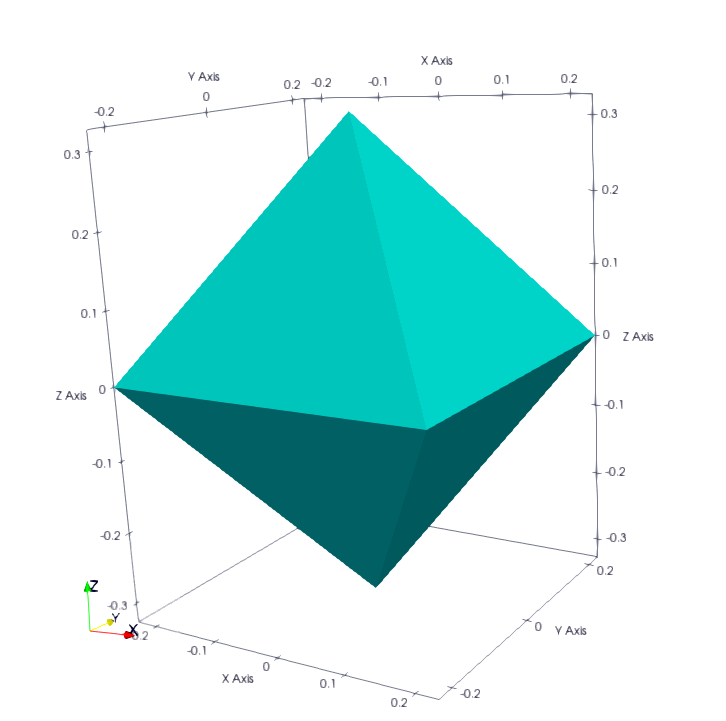
Example of a shape:
<
name Octahedron
radius 0.1
preCompDone y
nv 6
0.2310789034541148 -0.2310789034541148 0.0
0.2310789034541148 0.2310789034541148 0.0
0.0 0.0 0.32679491924311227
-0.2310789034541148 -0.2310789034541148 0.0
-0.2310789034541148 0.2310789034541148 0.0
0.0 0.0 -0.32679491924311227
ne 12
0 1
2 1
2 0
0 3
2 3
3 4
4 2
4 1
5 0
5 1
5 4
5 3
nf 8
3 0 1 2
3 2 3 4
3 1 2 4
3 0 2 3
3 0 5 1
3 0 5 3
3 3 5 4
3 4 5 1
obb.extent 0.33107890345411484 0.33107890345411484 0.4267949192431123
obb.e1 1.0 0.0 0.0
obb.e2 0.0 1.0 0.0
obb.e3 0.0 0.0 1.0
obb.center 0.0 0.0 0.0
position 0.0 0.0 0.0
orientation 1.0 0.0 0.0 0.0
volume 0.16666666666666666
I/m 0.04999999999999999 0.04999999999999999 0.04999999999999999
>
Example of Octahedron.vtk with paraview: