4.2. R-Shape / Polyhedron
In this section, we describe the various concepts used to build simulations with R-shape or sphero-polyhedron particles.
4.2.1. Overview
The polyhedra implemented in ExaDEM are sphero-polyhedra: the vertices are treated as spheres and the edges as cylinders. To achieve this, ExaDEM reuses many features of the Rockable DEM code developed at CNRS (https://github.com/richefeu/rockable, https://richefeu.github.io/rockable/quickStart.html). It relies in particular on a Shape class, which stores a polyhedron’s geometry (vertices, edges, faces, and Minkowski radius), and an interaction class used to qualify contacts between polyhedra. The sphero-polyhedron approach can also represent complex non-convex particles such as hexapods.
4.2.2. Shape
The Shape class stores a polyhedron’s vertices, edges, and faces, plus extra data to speed up calculations, such as an OBB (Oriented Bounding Box) per element. ExaDEM provides several operators around this class, such as reading .shp files (the format used by Rockable) or exporting a shape to .vtk for visualization. Its properties are:
Property Name |
Attribute Name |
Description |
|---|---|---|
Vertices |
|
List of the polyhedron’s vertices. |
Edges |
|
List of the polyhedron’s edges. |
Faces |
|
List of the polyhedron’s faces. |
Minkowski Radius |
|
Minkowski radius (radius of the vertices). |
Volume |
|
Total volume of the polyhedron. |
Inertia Coefficient |
|
Inertia coefficient normalized by mass. |
Name |
|
Name of the object (defaults to “undefined”). |
OBB |
|
Oriented Bounding Box of the polyhedron. |
Vertex OBBs |
|
List of |
Edge OBBs |
|
List of |
Face OBBs |
|
List of |
Note
Each OBB is enlarged by the shape’s Minkowski radius.
Note
Every shape is stored in a shared list, and the simulation’s cut-off radius is deduced from
the largest shape in that list. A cut-off radius that is too large can drastically reduce
performance, so avoid adding very large shapes through read_shape_file; define them as
drivers instead.
Shape example (octahedron, 6 vertices, 12 edges, and 8 faces):
<
name Octahedron
radius 0.1
preCompDone y
nv 6
0.2310789034541148 -0.2310789034541148 0.0
0.2310789034541148 0.2310789034541148 0.0
0.0 0.0 0.32679491924311227
-0.2310789034541148 -0.2310789034541148 0.0
-0.2310789034541148 0.2310789034541148 0.0
0.0 0.0 -0.32679491924311227
ne 12
0 1
2 1
2 0
0 3
2 3
3 4
4 2
4 1
5 0
5 1
5 4
5 3
nf 8
3 0 1 2
3 2 3 4
3 1 2 4
3 0 2 3
3 0 5 1
3 0 5 3
3 3 5 4
3 4 5 1
obb.extent 0.33107890345411484 0.33107890345411484 0.4267949192431123
obb.e1 1.0 0.0 0.0
obb.e2 0.0 1.0 0.0
obb.e3 0.0 0.0 1.0
obb.center 0.0 0.0 0.0
position 0.0 0.0 0.0
orientation 1.0 0.0 0.0 0.0
volume 0.16666666666666666
I/m 0.04999999999999999 0.04999999999999999 0.04999999999999999
>
Or a sphere (1 vertex, 0 edges, 0 faces):
<
name alpha1
radius 0.5
preCompDone y
nv 1
0 0 0
ne 0
nf 0
obb.extent 0.5 0.5 0.5
obb.e1 1 0 0
obb.e2 0 1 0
obb.e3 0 0 1
obb.center 0 0 0
volume 0.523598775598299
I/m 0.1 0.1 0.1
>
Using a spherical shape in a polyhedron configuration instead of a native sphere configuration decreases performance, due to unnecessary calculations such as applying an orientation to a single vertex – about 2 to 3 times slower in our benchmarks.
Operator Name:
read_shape_fileDescription: This operator initializes the shapes data structure from a shape input file.
Parameters:
filename: Input file name (.shp)scale_factor: rescale all shapes. Optional parameter.rename: rename all shapes. Optional parameter
YAML example:
- read_shape_file:
   filename: shapes.shp
   rename: [PolyR, Octahedron]
- read_shape_file:
   filename: shapes.shp
   rename:       [ PolyRSize2, OctahedronSize2]
   scale_factor: [        2.0,             2.0]
Example: See Example 6: Rescale shape .
4.2.3. Basic Shapes
ExaDEM provides some basic shapes without using a shape file.
Operator Name:
add_sphereDescription: Adds a sphere to the shape list.
Parameters:
name: Set the shape’s name. Default is “sphere”.minkowski: Set the Minkowski (radius) value.
- add_sphere:
   name: MySphere
   minkowski: 1.0
Operator Name:
add_cubeDescription: Adds a cube to the shape list.
Parameters:
length: Set the cube’s edge length.name: Set the shape’s name. Default is “cube”.minkowski: Set the Minkowski (radius) value.
YAML example:
- add_cube:
   name: MyCube
   length: 0.5
   minkowski: 0.25
Operator Name:
add_riceDescription: Adds a rice-shaped particle to the shape list.
Parameters:
length: Set the rice’s length.name: Set the shape’s name. Default is “rice”.minkowski: Set the Minkowski (radius) value.
YAML example:
- add_rice:
   name: MyRice
   length: 0.5
   minkowski: 0.025
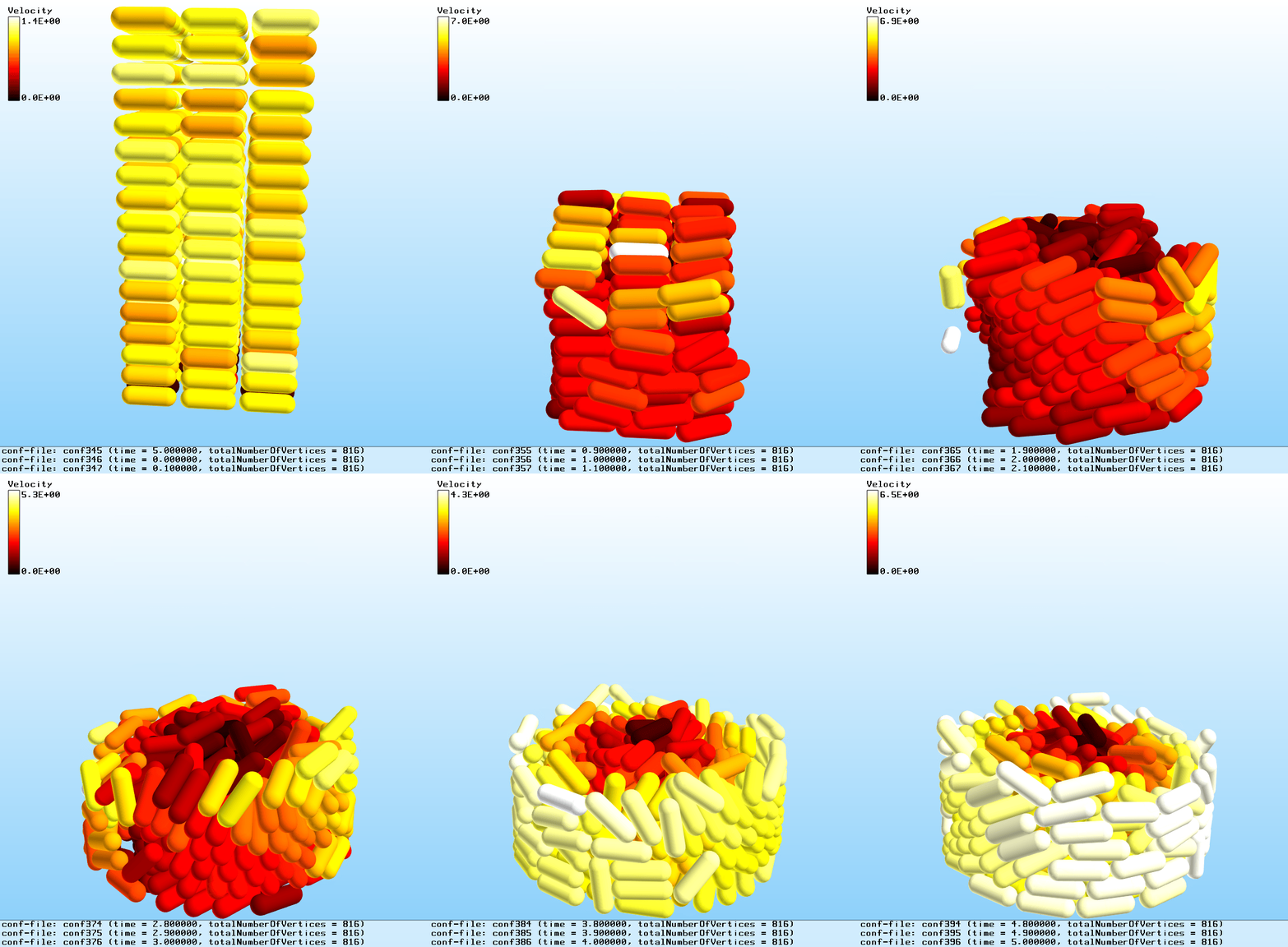
4.2.4. Polyhedra - Interaction / Contact
The exaDEM::Interaction class models a contact between two polyhedra, or between a polyhedron and a driver. It identifies the two elements involved and characterizes the kind of contact between them.
Note
This page describes how interactions are identified and stored; the contact law itself
(hooke, cohesive, dmt) and its parameters (kn, kt, kr, mu,
damp_rate, and, for cohesive/DMT variants, fc/dncut/gamma) are defined on the
Force Field page, see Contact Law Operators.
Interaction Class Attributes:
\(id_i\) and \(id_j\): Id of both polyhedra.
\(cell_i\) and \(cell_j\): Indices of the cells containing the interacting polyhedra.
\(p_i\) and \(p_j\): Positions of the polyhedra within their respective cells.
\(sub_i\) and \(sub_j\): Indices of the vertex, edge, or face of the polyhedron involved in the interaction.
type: Type of interaction (integer), see the glossary below.frictionandmoment: Temporary storage for contact-law computations.
Note
When the interaction is between a polyhedron and a driver, particle j locates the driver: cell_j is the driver’s index, and, for drivers that carry a shape (RShapeDriver), sub_j stores the index of the involved vertex, edge, or face.
Value |
Type |
Description |
|---|---|---|
0 |
Vertex - Vertex |
Contact between two vertices of two different polyhedra |
1 |
Vertex - Edge |
Contact between a vertex and an edge of two different polyhedra |
2 |
Vertex - Face |
Contact between a vertex and a face of two different polyhedra |
3 |
Edge - Edge |
Contact between two edges of two different polyhedra |
4 |
Vertex - Cylinder |
Contact between a vertex of a polyhedron and a cylinder |
5 |
Vertex - Surface |
Contact between a vertex of a polyhedron and a rigid surface or wall |
6 |
Vertex - Ball |
Contact between a vertex of a polyhedron and a ball / sphere |
7 |
Vertex - Vertex (Driver) |
Contact between a vertex of a polyhedron and a vertex of a RShape Driver |
8 |
Vertex - Edge (Driver) |
Contact between a vertex of a polyhedron and an edge of a RShape Driver |
9 |
Vertex - Face (Driver) |
Contact between a vertex of a polyhedron and a face of a RShape Driver |
10 |
Edge - Edge (Driver) |
Contact between an edge of a polyhedron and an edge of a RShape Driver |
11 |
Vertex (Driver) - Edge |
Contact between a vertex of a RShape Driver and an edge of a polyhedron |
12 |
Vertex (Driver) - Face |
Contact between a vertex of a RShape Driver and a face of a polyhedron |
13 |
Inner Bond |
Contact within a grain composed of fragments (polyhedra) |
Interaction Class Usage:
The class’s attributes identify the cells, positions, and interaction type of a given contact, which simulation computations then use to model that contact accurately.
Interactions are the unit of intra-node parallelization, on both CPU and (upcoming) GPU implementations. They are built by the nbh_polyhedron operator and then processed by contact_polyhedron.
Grid Of Interactions:
Interactions are stored in a grid of cells (an Array-of-Structures-of-Arrays): each cell (a Structure of Arrays) holds a GridExtraDynamicDataStorageT, essentially a vector of Interactions paired with a vector of particle information. This layout makes it straightforward to migrate interaction data between MPI processes for interactions considered always active (i.e. the two polyhedra stay in contact from one time step to the next). See src/interaction/include/exaDEM/interaction/grid_cell_interaction.hpp and the extra_storage package in ExaNBody for details.
Classifier:
To make GPU kernels for interactions more efficient, exaDEM also relies on the Classifier class, which sorts interactions by type into a Structure of Arrays, so that each kernel launch handles a single interaction type – reducing instruction divergence between GPU threads. See Views, Interactions & Classifier in the Developer Guide for a full description of Classifier and the View mechanism it’s built on.
This Classifier complements the interaction grid rather than replacing it: interactions are moved into it (classify_interactions) and back out of it (unclassify_interactions) only when the underlying data actually changes (cell migration, particle motion, I/O); otherwise they stay classified across time steps.
Using the classifier is currently exaDEM’s default strategy for both spheres and polyhedra.
4.2.5. Fragmentation Feature
Note
This feature is currently experimental.
exaDEM handles fragmentation by pre-cutting grains into small polyhedra and adding springs between opposite vertices to bond their faces together. To use this feature, include config_fragmentation.msp instead of config_polyhedra.msp.
Note
This section covers the geometric side of fragmentation: pre-cutting, sticking, and interface breakage. The bond force law itself and its parameters (
kn,kt,damp_rate, and the fracture criteriongorgn/gt) are defined on the Force Field page, see Inner Bond Forces.
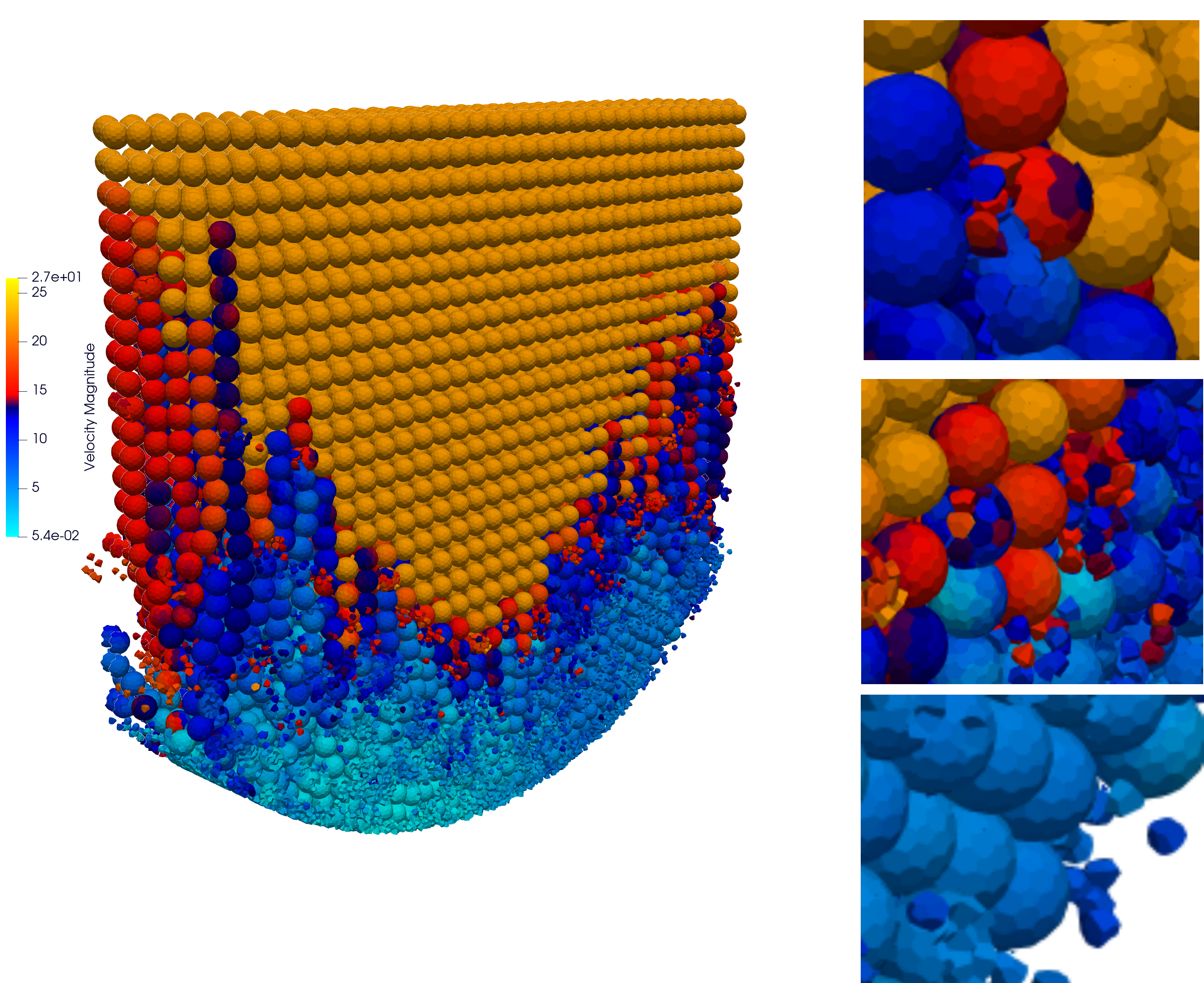
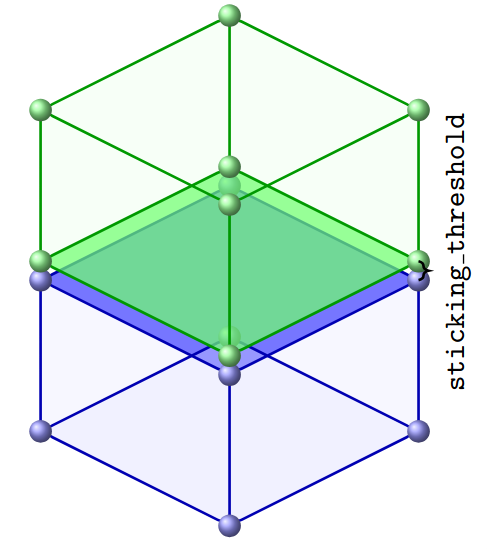
Particles stick together when the distance between opposite vertices falls below sticking_threshold (e.g. 1.e-04), set in the global block alongside apply_particle_sticking: true.
At each time step, exaDEM then checks every interface – a set of InnerBond interactions (type id 13) – to see whether the released energy exceeds a threshold that depends on the bonded surface area and a parameter g.
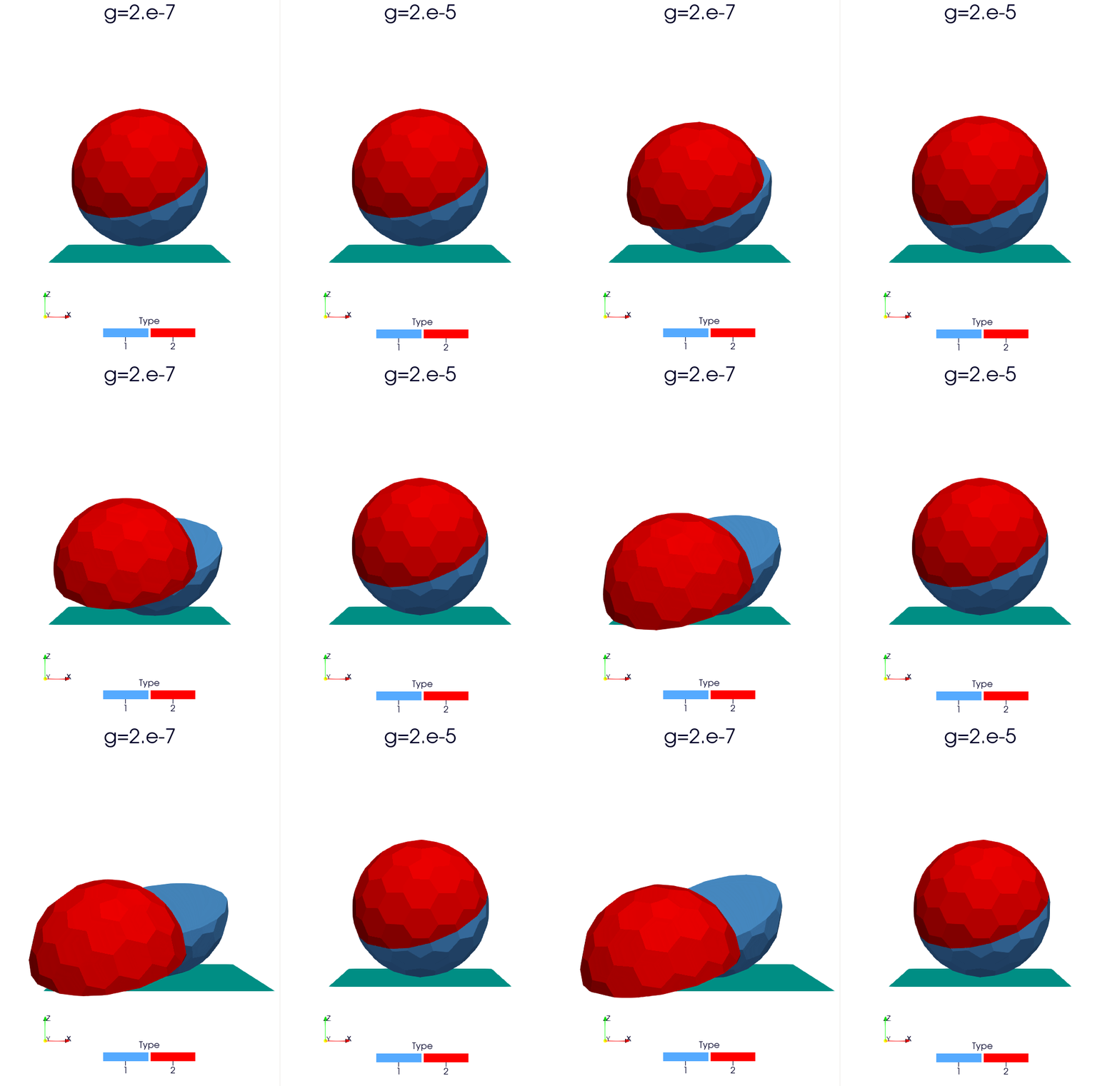
When an interface breaks, its interactions are removed and the interaction lists are rebuilt. Note that two particles stuck together by an interface cannot have any other kind of contact (vertex-vertex, vertex-edge, etc.) between them at the same time.
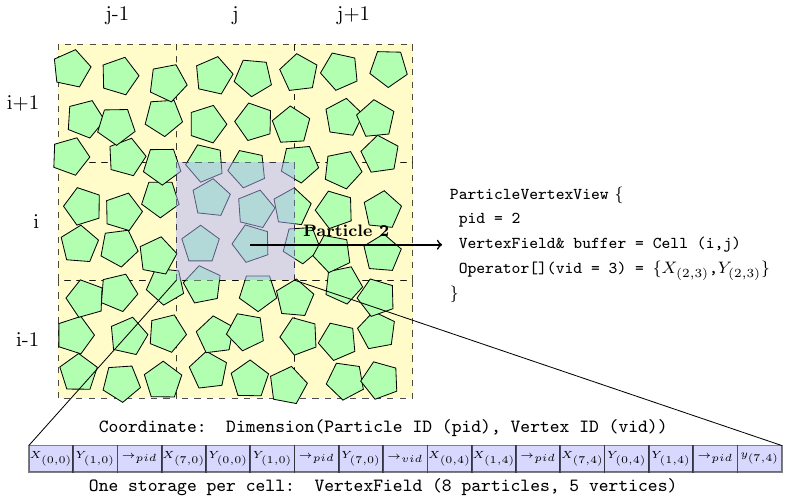
4.2.6. Data layout: Particle Vertices
Polyhedron vertices are stored in a separate grid structure, CellVertexField – a grid of VertexFields, reallocated by the compute_vertices operator. The image below illustrates this memory layout:
Operator name:
compute_verticesDescription: This operator computes the vertices for every polyhedron.
Parameters:
resize_vertex: Resize the vertex storage to fit the current data. Default istrue.minimize_memory_footprint: Size the vertex storage to just the maximum number of vertices actually needed per cell, based on the shapes present in that cell. Useful when a few particles have a much higher vertex count than the rest. Default isfalse.
YAML examples:
compute_new_vertices:
  - compute_vertices:
     resize_vertex: true
compute_fast_vertices:
  - compute_vertices:
     resize_vertex: false